Obchody s aplikacemi
Pro Windows, macOS a Linux můžete LibreOffice zdarma stáhnout z naší stránky. Pokud chcete získat LibreOffice v obchodech s aplikacemi Microsoft Store nebo Mac App store, můžete tak učinit zde:
Tyto verze jsou svobodný software s otevřeným zdrojovým kódem, ale platí se malý poplatek za úsilí s umístěním softwaru do obchodů s aplikacemi a jako příspěvek k vývoji.
Vývojové verze
Verze před vydáním
Chcete-li stáhnut verze před vydáním, použijte přizpůsobení stahování a vyberte si verze s označením “alfa”, “beta” nebo “RC”, pokud jsou k dispozici.
Verze před vydáním nejsou určeny pro produktivní provoz. Chcete nám pomoci? Přečtete si prosím poznámky k vydání a navštivte naši stránku o testování.
RC sestavení jsou ve finální konfiguraci a nahradí vaši stávající instalaci LibreOffice
Chcete-li tomu zabránit, použijte paralelní instalaci.
Noční sestavení
Noční sestavení jsou vývojové verze LibreOffice a slouží pro testovací účely. Funkčnost není garantována.
Na server s Nightly builds (noční sestavení) se dostanete zde.
Přehledný seznam hlavních sestavení.
Zdrojový kód a SDK
Veškerý náš zdrojový kód je uložený v gitu. Spusťte
git clone https://git.libreoffice.org/core
pokud ho chcete klonovat (zobrazit).
Další pokyny najdete v sekci věnované vývoji na naší wiki. Podívejte se na naše licence.
Stáhnout SDK
LibreOffice_26.8.1_Linux_x86-64_rpm_sdk.tar.gz (Torrent, odkazy na všechny zrcadla)
LibreOffice_26.8.1_Linux_aarch64_rpm_sdk.tar.gz (Torrent, odkazy na všechny zrcadla)
LibreOffice_26.8.1_Linux_x86-64_deb_sdk.tar.gz (Torrent, odkazy na všechny zrcadla)
LibreOffice_26.8.1_Linux_aarch64_deb_sdk.tar.gz (Torrent, odkazy na všechny zrcadla)
LibreOffice_26.8.1_MacOS_x86-64_sdk.dmg (Torrent, odkazy na všechny zrcadla)
LibreOffice_26.8.1_MacOS_aarch64_sdk.dmg (Torrent, odkazy na všechny zrcadla)
LibreOffice_26.8.1_Win_x86-64_sdk.msi (Torrent, odkazy na všechny zrcadla)
LibreOffice_26.8.1_Win_aarch64_sdk.msi (Torrent, odkazy na všechny zrcadla)
Stáhněte si zdrojový kód v archivním formátu
libreoffice-26.8.1.1.tar.xz (Torrent, odkazy na všechny zrcadla)
libreoffice-dictionaries-26.8.1.1.tar.xz (Torrent, odkazy na všechny zrcadla)
libreoffice-help-26.8.1.1.tar.xz (Torrent, odkazy na všechny zrcadla)
libreoffice-translations-26.8.1.1.tar.xz (Torrent, odkazy na všechny zrcadla)
Starší verze
Starší verze LibreOffice (již neaktualizované!) jsou k dispozici v archivu.
LibreOffice Impress Remote
Aplikace LibreOffice Impress Remote vám umožňuje ovládat prezentace z chytrého telefonu nebo chytrých hodinek. Aplikace je k dispozici pro chytré hodinky Android, iOS a Pebble.
Pro více informací o této aplikaci navštivte wiki stránku.
LibreOffice pro Android a iOS
Nadace The Document Foundation nabízí prohlížecí aplikaci pro dokumenty LibreOffice s experimentální podporou úprav pro zařízení Android:
Pro úpravu dokumentů je v obchodech s aplikacemi k dispozici produkt založený na LibreOffice od společnosti Collabora, jednoho z našich certifikovaných vývojářů a členů ekosystému:
LibreOffice Portable
LibreOffice Portable je plnohodnotná přenosná verze LibreOffice pro Windows – včetně textového editoru, tabulkového procesoru, nástroje pro prezentace, kreslicího programu a databáze – zabalená jako přenosná aplikace, takže si můžete vzít s sebou všechny své dokumenty a vše, co potřebujete k práci s nimi. Je zabalena ve formátu PortableApps.com, takže může fungovat s platformou PortableApps.com a jejími automatickými aktualizacemi a obchodem s aplikacemi, pracovat s dalšími přenosnými nabídkami nebo fungovat samostatně z USB disku, cloudu nebo místního disku. Je open source a zcela zdarma.
Stažení se všemi jazyky (MultilingualAll) zahrnuje všechny jazyky podporované LibreOffice.
LibreOffice je zabalen pro přenosné použití společností PortableApps.com se souhlasem a pomocí od The Document Foundation. Chcete-li si balíčky stáhnout a získat další informace a podporu, navštivte prosím tuto stránku (pro nejnovější verzi LibreOffice Portable) a tuto stránku (pro předchozí verzi LibreOffice Portable).
LibreOffice přes Chocolatey
Stáhněte si LibreOffice z Chocolatey.
LibreOffice ve formátu Flatpak
Flatpak je způsob distribuce obrazů linuxových aplikací, které běží na široké škále různých distribucí a běží tam bezpečným způsobem.
Nejnovější verze LibreOffice ve formátu Flatpak jsou k dispozici na Flathubu (přímý odkaz pro stažení org.libreoffice.LibreOffice.flatpakref).
Několik poznámek:
- LibreOffice Flatpak používá backend GTK3 od LibreOffice, který by měl nabízet nejkompletnější sadu funkcí v LibreOffice, včetně podpory pro Wayland.
- Lokalizační data jsou přesunuta do rozšíření org.libreoffice.LibreOffice.Locale. Jeho instalace by měla být transparentně řešena infrastrukturou Flatpak.
- Nápověda je k dispozici jako rozšíření org.libreoffice.LibreOffice.Help. Pravděpodobně si ji budete muset nainstalovat ručně. (Prozatím obsahuje nápovědu pro všechny lokalizace, takže je poměrně rozsáhlá.)
- V současné době neexistuje žádná verze Flatpak pro LibreOffice Software Development Kit (SDK).
- Chyby, které se objevují pouze ve verzi Flatpak, by měly být hlášeny na Flathub.
LibreOffice jako Snap
Snapy se rychle instalují, snadno se vytvářejí, jsou bezpečné pro spuštění a aktualizují se automaticky transakčním způsobem, takže je aplikace vždy aktuální a nikdy není rozbitá. Jejich cílem je fungovat na jakékoli distribuci nebo zařízení, od zařízení IoT po servery, od stolních počítačů po mobilní zařízení.
Instalace LibreOffice z obchodu
Aktuální verze LibreOffice jsou dostupné na Snap store v 64-bit verzi.
Instalační balíček LibreOffice můžete instalovat z následujícího zdroje:
https://snapcraft.io/libreoffice
nebo instalovat pomocí příkazové řádky:
sudo snap install libreoffice
Pokud vám chybí příkaz snap, budete možná muset nejprve nainstalovat snapd.
Spuštění verze LibreOffice nainstalované jako snap
Po instalaci najdete verzi LibreOffice nainstalovanou přes snap v nabídce Aplikace.
Případně ji lze spustit příkazem:
/snap/bin/libreoffice
Omitting the full path likely starts the version of LibreOffice installed by the distribution instead, if there is one.
Více detailů o Snap je dostupných na domovské stránce Snap.
Note that bugs only appearing in the Snap version should be reported to Ubuntu’s Launchpad.
LibreOffice as AppImage
AppImage is a portable application format for Linux that allows users to run applications on rolling (e.g. Arch, openSUSE Tumbleweed) and stable (e.g. Ubuntu LTS, Red Hat Enterprise Linux) Linux distributions very easily, without the need for installation or worry of dependencies. AppImages bundle all the files needed for an application to run (e.g. libraries, translations, icons, fonts) that may not already be present on a user’s system.
LibreOffice AppImage is a portable version of LibreOffice for Linux that can be run from any location (e.g. local drive, USB, CD, network share) on all popular Linux distributions, including their live CDs. LibreOffice AppImage is available in three versions - Basic, Standard, and Full - which support a different set of languages.
Základní verze obsahuje podporu pro výchozí jazyk, angličtinu (USA).
Stáhnout nejnovější Základní verzi
Stáhnout předchozí Základní verzi
The Standard version includes support for English (US and GB), Arabic, Chinese (Simplified and Traditional), French, German, Italian, Japanese, Korean, Portuguese (Brazilian and Portugal), Russian, and Spanish.
The Full version includes all languages supported by LibreOffice.
More Downloads
Additional LibreOffice Appimages can be found browsing the LibreOffice AppImage repository.
Running the AppImage from the GUI
- Open your file manager and browse to the location of the AppImage
- Right-click on the AppImage and click the ‘Properties’ entry
- Switch to the Permissions tab and
- click the ‘Executable as Program’ checkbox if you are using a Nautilus-based file manager (Files, Nemo, Caja)
- click the ‘Allow executing file as program’ checkbox if you are using Dolphin
- click the ‘Allow this file to run as a program’ checkbox in Thunar
- change the ‘Execute’ drop down list to ‘Anyone’ if you are using PCManFM
- Close the dialog
- Double-click on the AppImage file to run
Running the AppImage from the Terminal
- Open your terminal application, if not already open
- Browse to the location of the AppImage
- Make the AppImage executable
$ chmod a+x LibreOffice\*.AppImage
- Run it
$ ./LibreOffice\*.AppImage
Notes
- LibreOffice AppImages repackage the same binary files found in the .tar.gz files that are distributed on the main download page, through a build script hosted on LibreItalia’s version control system.
- LibreOffice AppImages will run on the distributions that will run an installed version of LibreOffice, but expect the user’s system to have some libraries that aren’t bundled with the AppImage, like Java (used in Base) and GStreamer (used in Impress).
- LibreOffice AppImages were tested and run on these old versions of stable distributions and their newer versions - Ubuntu 10.04 LTS, Debian 6, Fedora 12, openSUSE 11.3, Mageia 2, PCLinuxOS 2013.07.15, Puppy 6, Salix 13.37 (Slackware), CentOS 6
- LibreOffice AppImages were tested and run on these rolling distributions - Solus, openSUSE Tumbleweed, Arch Linux, Gentoo Linux, Tails
- LibreOffice AppImages use the existing user profile of an installed version of LibreOffice on your system or create one if none exist. For LibreOffice AppImages that use their own user profile folder (so they won’t conflict with the user profile of an installed version of LibreOffice on your system), go to the LibreOffice Portable AppImage repository.
- LibreOffice AppImages are currently only available as 64-bit executables, so they will only run on 64-bit Linux distributions.
- AppImages require FUSE to run. If your system does not have a working FUSE setup, you can still extract the contents of the AppImages using the --appimage-extract option.
- AppImages aren’t sandboxed, so if you’ll like to run them that way, please read this guide to sandbox with firejail.
LibreOffice Online
What is it?
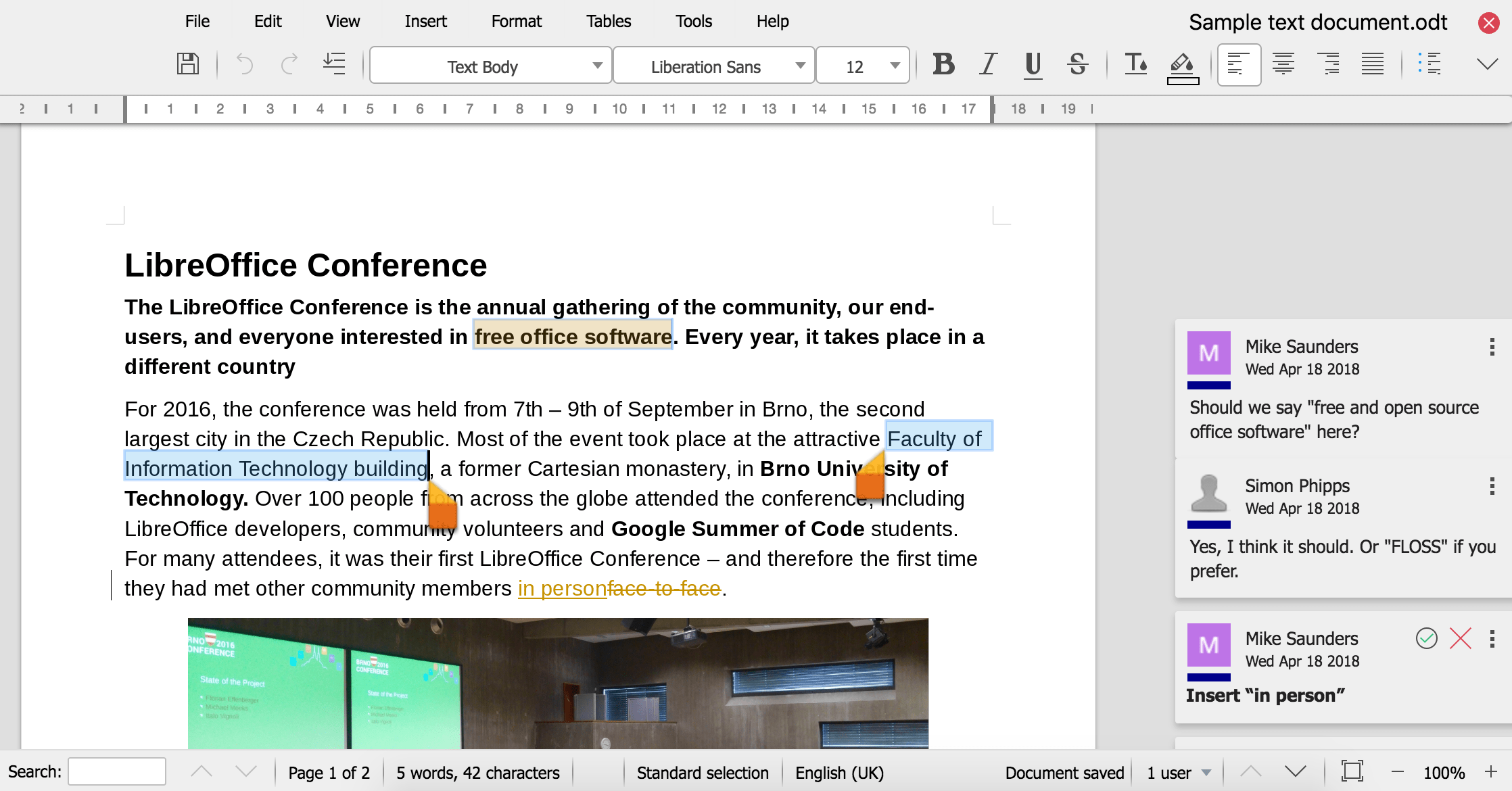
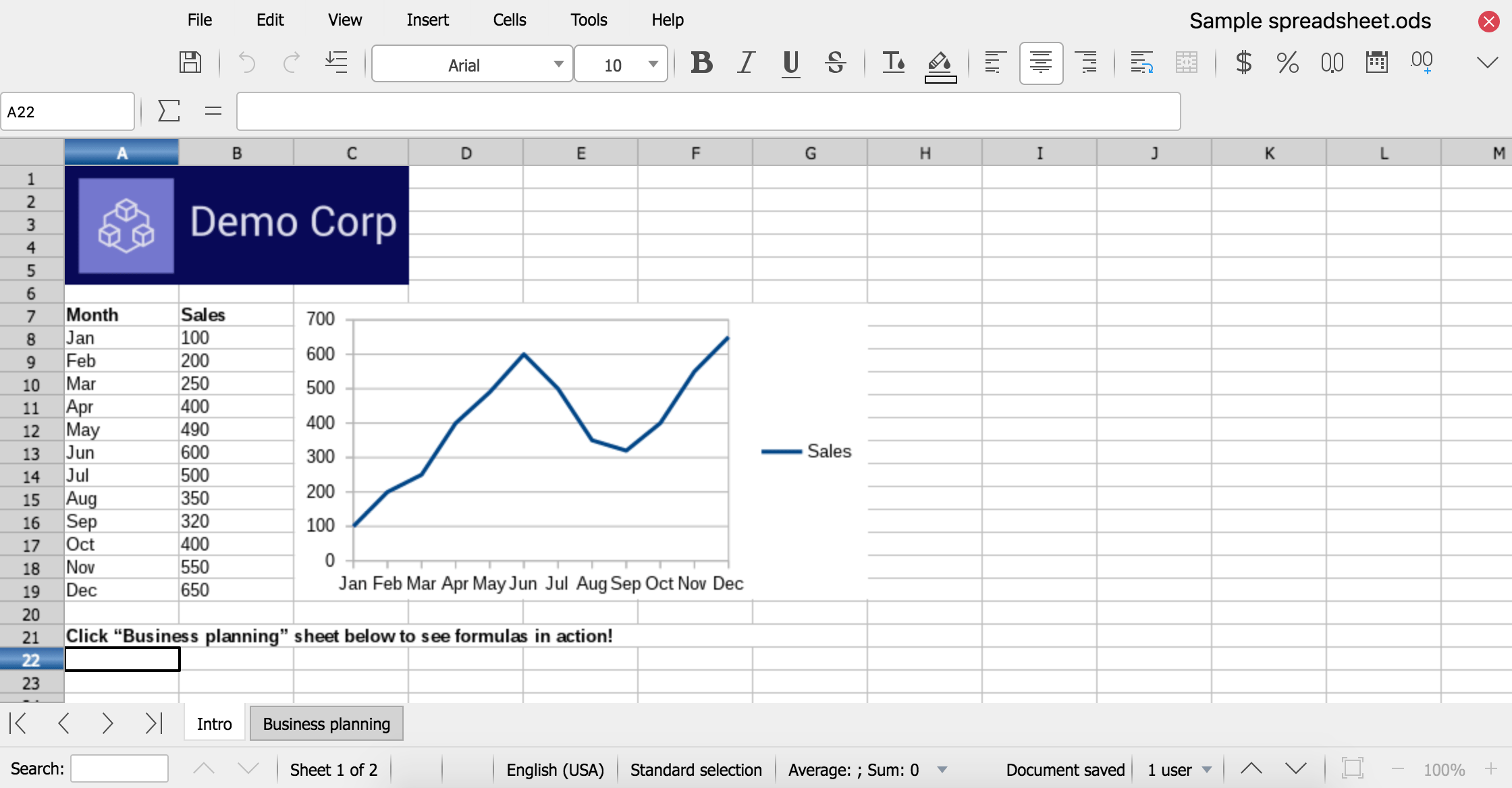
LibreOffice Online is a server service built from the main LibreOffice project code, which provides display and collaborative visual editing of a range of document types in a web browser. It does not include any form of file system. To be fully functional, it has to be integrated with file access and authentication provision from an underlying stack of software.
For anything more than casual use it also needs to be deployed with due consideration for load balancing and other scaling issues. As such, LibreOffice Online can be considered an enabling technology for the public cloud of ISPs or the private cloud of enterprises and large organizations, when integrated - for example - with an enterprise file sharing or a groupware solution.
Why not provide a hosted service?
The Document Foundation is not planning to develop and fund a cloud solution similar to existing products from Google and Microsoft, because this would require selection and integration of the other technologies needed for deployment - file sharing, authentication, load balancing and so on - which for desktop LibreOffice is part of the operating system provided by the user. This would be a significant growth of scope and not in line with the original mission of the project. The task is therefore left to large deployers, ISPs and providers of open source cloud solutions, and several options are already available on the market. TDF would welcome provision of a public LibreOffice Online offering by another charity.
Why is this un-supported?
TDF does not offer end-user support for any of the projects it hosts. End-user collaborative self-help is available at ask.libreoffice.org.
Since LibreOffice Online requires integration with many other technologies to allow deployment, The Document Foundation will not be maintaining binaries for enterprise use. Even if it were reasonable to pre-select all the elements of a deployment stack, providing enterprise production binaries would create expectations which could not be fulfilled by volunteer-based support.
However, builds of the latest code suitable for home users and for contributing to development - which is encouraged - are available. TDF is keen to avoid situations where an unsuitable version is deployed at scale, so when used in what would be likely to imply an enterprise situation - more than 10 concurrent documents and/or more than 20 connections - LibreOffice Online will display a prominent “not supported” warning and a link to this page, while continuing to function.
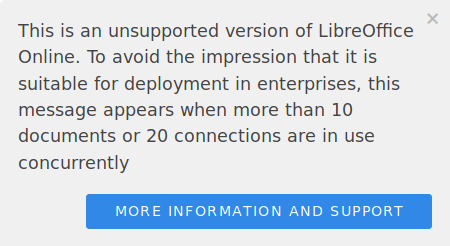
We encourage others providing un-supported binaries derived from LibreOffice to follow this pattern.
How can I get support and help fund development?
The Document Foundation suggests that all large-scale deployers of LibreOffice use certified developers either directly or via a commercial provider who employs them. This is especially important for LibreOffice Online where your business plays an important role paying for the further development of the software.
Please do not attempt a public or enterprise production deployment of LibreOffice Online without professional support. As explained above, it is not intended for direct production deployment.
Can I use this for free?
Absolutely, LibreOffice Online is Open Source Free software, just download and use it, inspect, study, share, modify and contribute back to the project. Just be aware that the version you have downloaded is designed for personal and/or development use so there is an un-supported notification displayed when you exceed to 10 concurrent documents and 20 connections.
How can I compile a version without this warning?
LibreOffice is Open Source Free software and you are entitled to make whatever changes you wish to the source code. Each version of LibreOffice Online has a Help/About page with the Git hash of the source code it is built from and a link to clone that source. Please bear in mind that if you remove such support statements from the code you may need to change the name of the project, especially if you intend to make it available outside your organisation - check out our trademark guidelines. This also serves to make it clear that you are committing to support the version you have created.
Getting it
While TDF provides only source releases, there are binaries available from many other sources including:
TDF provides source code releases of LibreOffice Online.